In CNC machining process, CNC control panel is a key element and be set in CNC lathe, CNC mill, CNC router, CNC wedm etc. It is used to set parameters to program the machine running.
CNC operation panel explain, to see what these CNC Machine keys means?
Everyday, CNC worker should contact the machining center operation.
LET’S SEE WHAT THESE CNC PANEL BUTTONS MEAN IN CNC MACHINING CENTER PROGRAMMING.

CNC RED BUTTON IS THE EMERGENCY STOP BUTTON.
Press this switch and the CNC machine will stop, usually in an emergency or unexpected state. Then, all actions of machines, such as turning, milling movement is stop.

CNC CONTROL PANEL EXPLAIN START FROM THE LEFT. THE BASIC MEANING OF THE FOUR KEYS IS:
- Program automatic operation refers to the automatic operation of the program in the processing sequence. It is a commonly used machining process. In this state, the operator only needs to fix the product, and then press the program start key.
- The second is the program editing button. It is mainly used for editing programs.
- The third is the MDI mode, which is mainly used for manual input of short code such as S600M3.
- DNC mode is mainly used for connection processing

CNC OPERATION PANEL EXPLAIN FROM LEFT TO RIGHT, THE FOUR BUTTONS ARE:
- Program return to ZERO button, for return to zero operation.
- Fast feed mode. Press this button to match the corresponding axis to move quickly.
- Slow feed, press this button and the machine moves slowly accordingly .
- Handwheel keys, press this key to operate the handwheel.

THESE CNC PROGRAMMING FOUR KEYS OF MACHINING CENTER ARE:
- Single section execution, press this key program to execute a section will stop.
- Program segment skips instructions. If there is a symbol in front of a program segment, press this key and the program will not execute.
- Choose to stop. When there is M01 in the program, press this key and the code will work.
- Manual Demonstration Instructions

THREE KEYS OF CNC MACHINING CENTER OPERATING PANEL EXPLAIN
- Program restart button.
- Machine latching command, press this key machine will lock, do not move. Used for debugging.
- Empty operation, usually with latch command of machine tool, for debugging program.
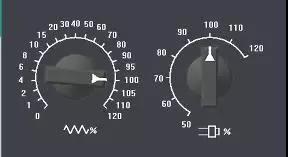
TWO KONBS MEAN OF CNC MACHINING CONTROL PANEL:
The switch on the left is used to adjust the feed rate. On the right is the spindle speed adjustment button.

FROM LEFT TO RIGHT, 3 KEYS MEAN:
The loop start button, Program pause, Program MOO stop.
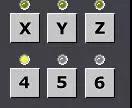
CNC OPERATION PANEL SPINDLE KEY:
This represents the corresponding spindle. Normally, there are no 5-axis and 6-axis machine tools. Neglectable

CNC MACHINING SPEED CONTROL KEYS:
Used to control the movement of machine tools. Press the key in it and it will feed quickly.

CNC SPINDLE DIRECTION CONTROL KEYS:
The spindle turns forward, the spindle stops and the spindle reverses.
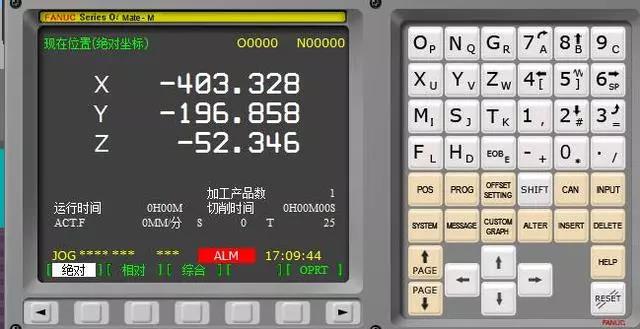
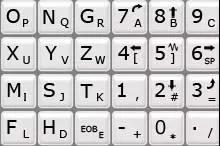
CNC DIGITAL PANEL AND SCREEN:
The digital alphabet panel, which needs no explanation, is like the keyboard of a mobile computer.
POS key is the meaning of coordinate system. Press this key to see the absolute coordinate machine tool coordinate system with relative coordinates.
ProG is a program key, and the corresponding program operation usually needs to be operated in the mode of pressing this key.
OFFSETSETTING is used to set the coordinate system in tool setting.
Shift is the shift key.
CAN is to cancel the key error instruction can be cancelled by pressing this key.
IUPUT is the input key, which is needed for general data input and parameter input.
SYETEM system key. Mainly used to view system parameter settings.
MESSAGE is mainly information prompt.
CUSTOM Graphic Parameter Command.
ALTEL is a replacement key used to replace instructions in programs.
Insert is used for inserting instructions into program code.
Delete is mainly used to delete code.
RESET is an important button. It is mainly used to reset, stop the program and stop some instructions.
The keys are basically finished, familiarity needs to be practiced on the CNC machining works.
KYLT CNC Machining Services:
KYLT CNC Precision Machined Parts:
More information about Machining Technology:
评论
发表评论